
Tiny Desk AI App
App preview
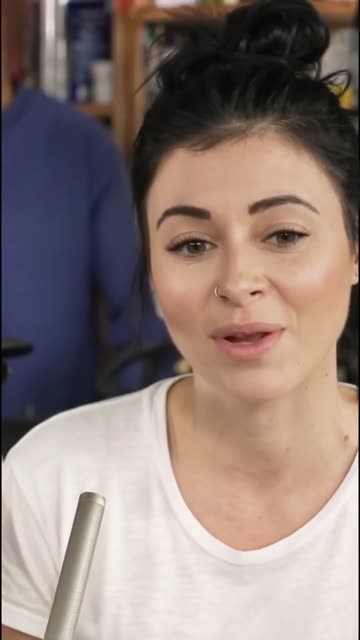

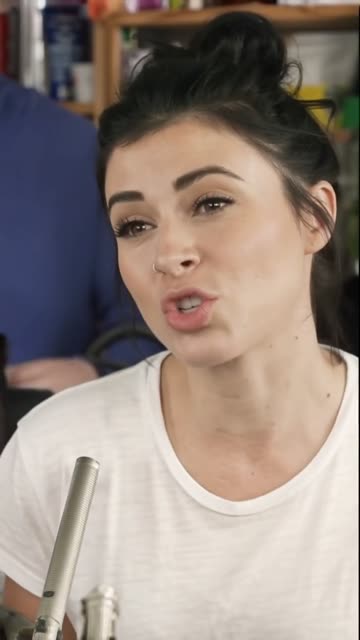
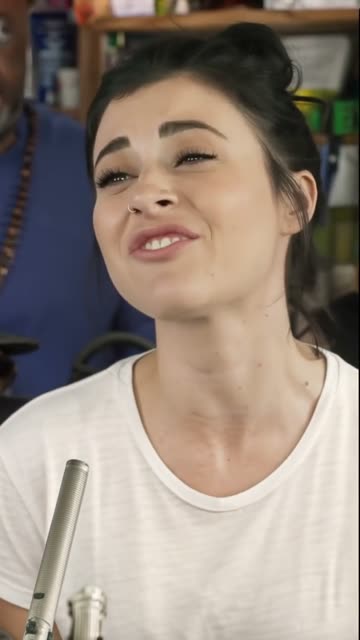
Images from the official website.
Tiny Desk AI App is a browser-based tool for turning one portrait photo into a short, concert-style AI video. It is built for a specific social-video format rather than open-ended video editing: the site says it replaces the lead performer in a 15-second clip while keeping the surrounding band and original performance audio. You do not install an Android package to use it. The important trade-offs are the paid per-video model, strict consent rules for photos, and the site's personal, non-commercial sharing limit.
What the generator actually makes
The output described by the developer is a 720p, vertical 9:16 MP4 lasting about 15 seconds. It follows a fixed close-up from the Charlie Wilson “Outstanding” Tiny Desk performance. This is not a tool for choosing a different singer, song, camera angle, concert set or clip length. The website describes the process as putting the person in your photo in the singer's place; it also warns that the result will resemble the person, not be a perfect copy. Treat the site's sample clips as examples of its intended format, not a promise that every face or photo will render equally well.
That narrow format can be useful for a personal joke, a birthday message or a consensual friend-group video. It is a poor fit if you need to edit an original recording, change the soundtrack, deliver a brand campaign or control every visual detail. The service's own footer says it is an independent, unofficial fan tool and is not affiliated with NPR, NPR Music, Tiny Desk Concerts, Charlie Wilson or any record label. The site does not grant rights to the underlying music.
How to prepare a photo and generate a clip
Start on the official web app and use its photo upload control. The accepted formats shown there are JPG, PNG and WebP, with a 10 MB file limit. Its guidance favors a single adult with a clearly visible, front-facing face, even light and the head and shoulders in frame. Group shots, sunglasses and heavy filters are discouraged. A simple, well-lit portrait is therefore a better first attempt than a busy group photo, although no particular input guarantees a good result.
The site requires you to confirm that you are an adult and are uploading your own photo or one belonging to another adult who consented. Its terms prohibit minors, celebrities and public figures, impersonation, harassment and infringing material. After selecting a photo, the stated workflow is Google sign-in, purchase of a video pack, generation and download. The site's estimate is roughly four to six minutes to make a clip; it is an estimate, not a measured completion time. Review the finished video before sharing, especially the face, hand movements and AI-generated label.
If you instead need a timeline for trimming your own footage, adding captions and arranging multiple shots, CapCut serves a different purpose. Canva is more appropriate when the main job is assembling branded graphics or a flexible social-media layout. Tiny Desk AI App is simpler only because it concentrates on one preset performance. It does not replace those tools for general editing.
Price, credits and what happens when a render fails
On October 28, 2026, the official pricing page listed one video for US$7.90, three for US$18.90 and six for US$28.90. These are one-time packs, not a subscription. Each credit is for one 15-second render, and the site says unused credits do not expire while the service operates. It advertises no watermark. Taxes are calculated at checkout, so the total can differ from the displayed pack price. Card payment is listed, with Apple Pay or Google Pay where available. Check the live checkout before paying because prices, payment methods and taxes can change.
The site says a failed render returns a video credit to the account automatically; this is not necessarily the same as an immediate cash refund. Its refund policy says an entirely unused pack can be refunded on request within 14 days of purchase. It also invites a request within 14 days if a finished result is unsatisfactory, using the order ID. Approved refunds return to the original payment method and may take five to ten business days to appear. Read the current policy before buying rather than assuming every partially used pack is automatically refundable.
Photos, retention and sharing rights
Uploading a face photo is a more significant privacy decision than installing an ordinary video player. According to the site's privacy policy, Google sign-in supplies a name, email address and profile picture. The service stores the uploaded photo, a reference frame and the generated video to fulfill the request; an AI rendering provider and automated safety classifier may process the photo. The policy says uploaded photos are deleted after seven days, reference frames within eight days and completed videos after 30 days unless deleted earlier. It also says photos are not used to train models. These are the operator's published commitments, not an independent audit by YouxiSky.
The terms permit personal, non-commercial social sharing of generated videos. They require the AI-generated label to remain and ask users not to present a clip as real footage. Because the person video uses audio from the original performance, the operator expressly says it grants no music rights and forbids commercial use. Someone planning a monetized promotion, client project or advertisement should not infer a license from paying for the generation credit. Obtain the necessary permissions separately or choose a workflow using material you are licensed to use.
Common questions before using Tiny Desk AI App
Is there an Android app to install?
No Android store listing has been verified for this product. The specified service runs from tinydeskaiapp.com in a web browser. The button on this page opens that website rather than a Google Play install page. You will need a suitable browser, an account and a photo that meets the site's rules.
Can I make a free video?
The official pricing page currently presents paid video packs starting at US$7.90 for one render. It does not list a free finished-video allowance. You can inspect the examples and upload instructions before choosing whether to pay, but do not assume a completed, downloadable clip is free.
Can I use a friend's photo?
Only if the friend is an adult and has agreed to this use. The terms prohibit photos of minors, celebrities and public figures, as well as impersonation or deceptive sharing. Consent to take a photo is not automatically consent to upload it to an AI service, so ask specifically before submitting it.
Can I use the output for my business?
Not under the site's stated terms. It allows personal, non-commercial sharing and says it does not grant rights to the original music. A commercial use needs a separate rights analysis and permissions; a purchased video pack covers generation credits, not a music or performance license.
How long are my uploaded files kept?
The published privacy policy states that uploaded photos are deleted after seven days, reference frames within eight days and generated videos after 30 days. It also says you can download or delete videos and request account deletion. Review the current policy if retention is decisive for you, because these practices may change.
Who should use it?
This service is most relevant to an adult who wants one specific, playful concert-style clip and is comfortable with the cost, photo processing and non-commercial restriction. It is not the right tool for a creator needing original licensed music, multiple scenes, detailed editing control or an Android-native app. We have checked the operator's public pages but have not purchased a pack or independently tested rendering quality, timing or deletion behavior. Use the official Tiny Desk AI App website for the current product and policy details.
App information
- Title
- Tiny Desk AI App
- Category
- Video
- Platform
- Web browser
- Website
- Visit official site