VLC for Android
App preview
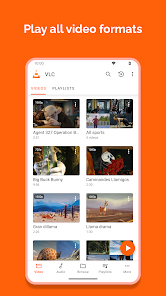
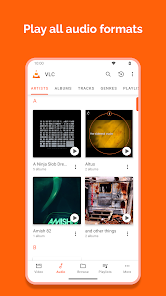
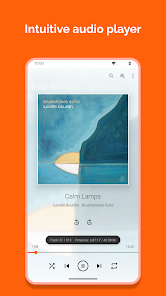
Images supplied with this app listing.
VLC for Android is VideoLAN's free, open-source media player for local files and network streams. Its Google Play listing says there are no ads or in-app purchases, and names formats including MKV, MP4, AVI, MOV, FLAC and AAC. It is a player, not a subscription catalogue that supplies movies or music. You provide files or a lawful stream you can access; VLC helps open, navigate and play them. That makes it especially useful when a phone's default player will not handle a subtitle track, audio format or network share. The trade-off is that broad format and file access bring settings and permissions that a simple streaming app may hide.
Start with the source of the media
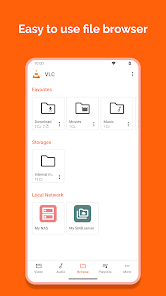
VideoLAN says the Android port can open local video and audio, network streams, network shares, drives and DVD ISO files. These are different sources. A video stored on the device can be browsed in the media library or by folder; a file on a network share needs the phone to reach that network and may require the share's credentials. An internet stream needs a valid address and connectivity. If playback fails, first identify whether the problem is file access, network access or the media itself instead of assuming every failure is a codec problem.
The listing describes adaptive streaming and many included codecs, with no separate codec download required for the formats it names. “Most files” is a better promise than “every possible file”: a corrupt file, unsupported protection scheme or unavailable server can still fail. Test a troublesome file directly from your own storage before relying on a format list alone. The app does not provide legal rights to media simply because it can open a technical format.
Audio and subtitles are more than extras
VLC supports multiple audio tracks, subtitles, Teletext and closed captions according to the official listing. For a film with several languages, inspect the track menu before converting the file or downloading another copy. The correct track may already be embedded. A separate subtitle file must be associated with the video; the Play description says the app may store subtitles, but does not promise that every external subtitle file will be found automatically. Check naming and location when one does not appear.
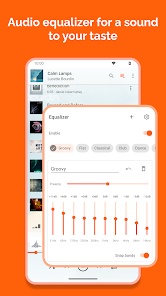
The audio side has its own library, equalizer and filters. Cover art, headset controls and an audio widget support music or podcasts while the screen is not focused on video. If your main use is a personal music collection, organize folders and metadata so the library can remain useful. Equalizer changes can improve comfort for a particular headphone, but they are subjective; the app's support for filters is not proof that one preset universally sounds better.
Viewing controls and a first playback check
The Play page names auto-rotation, aspect-ratio adjustments and gestures for volume, brightness and seeking. These can make a small screen easier to use, though they can also be triggered accidentally. Open one familiar file and learn where the track, subtitle and aspect controls live before using VLC for a long trip. If the image looks stretched, adjust the aspect option rather than assuming the source was encoded incorrectly. If sound is missing, inspect the selected audio track and device volume before blaming the file.
A network file needs extra checks. Confirm that the phone is on a network able to reach the server, then try one known-good file. If local playback works but the network copy does not, investigate the connection or share access first. VLC's ability to handle network streams does not mean it can bypass a password, a service's DRM or regional restrictions. For a very different video need, YouTube is a hosted content service; VLC is chiefly a player for media sources you choose.
Why the app asks for permissions
VideoLAN's unusually detailed Play description explains the access it requests. Photos, media, file and storage permissions let it read local and SD-card content. Network access opens streams and shares. Keeping the phone awake supports uninterrupted video. Audio settings support volume, while drawing over other apps is used for its custom picture-in-picture widget. Android TV startup and microphone access are described for recommendations and voice search on TV devices. A request should be judged against the feature you plan to use, not accepted solely because the app is popular.
The listing also mentions modifying or deleting USB storage content to allow file deletion and subtitle storage. If you only want to play a single local file, review the current Android permission prompt and the app's chosen library folders. Broad file permission is a functional capability, but it still deserves attention. VideoLAN says the app is open source and has no ads, purchases or spying; those are the developer's published claims, not the result of an independent security audit by this site.
What free really means here
Google Play lists VLC for Android as free, and VideoLAN's own description explicitly says no ads and no in-app purchases. You do not need a VLC subscription to use its listed player controls. That does not make paid films, network services or internet data free. Any third-party server or media service has its own terms. The Play page does not provide one fixed minimum Android version in the description reviewed here; use the compatibility message for your device.
Questions before installing
Does VLC include movies or music?
No catalogue is promised in the official Android listing. VLC plays local files, network streams and shares that you supply or can lawfully access. It is not the same kind of product as a subscription streaming service. A blank library usually means there are no indexed files in the locations VLC can read, not that a movie database failed to load.
Can it play a video with a separate subtitle track?
The official description lists subtitle and multi-track support. Inspect the track menu for embedded subtitles, and check the file location and name for an external subtitle. Support for subtitle playback does not promise automatic discovery of every file or format in every folder, so test the exact media you plan to use.
Why does it need file and network access?
File access lets the app discover and read local or SD-card media; network access is needed for streams and shared drives. Other permissions enable specific features such as picture-in-picture or Android TV voice search. Review each current Android prompt against the feature you want and VideoLAN's published permission explanation.
Editorial verdict
VLC for Android is a strong fit for people with their own varied media library or network files, especially when tracks, subtitles and formats matter. It is less useful if you expect an app to supply a licensed content catalogue or to fix a broken server address. Its no-ad, no-purchase model is unusually clear, while broad file permissions merit an informed choice. This is an assessment of VideoLAN's published capabilities, not a personal codec benchmark or security certification.
Official source: VLC for Android on Google Play. Store details checked October 27, 2026.