Smart TV Player: IPTV & M3U
App preview
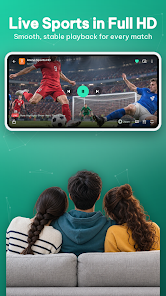
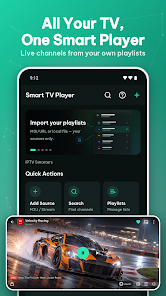
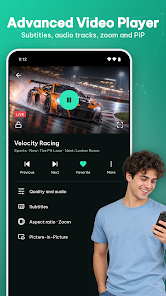
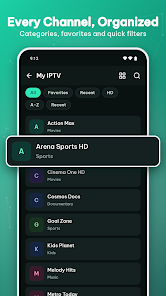
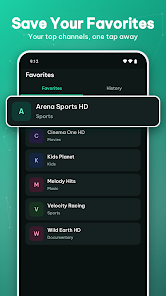
Images supplied with this app listing.
Smart TV Player: IPTV & M3U is an Android media player for playlists and streams you already have the right to use. Its Google Play page, first published on October 4, 2026, says it accepts M3U links or files, Xtream Codes credentials, Stalker portals, and a single-stream URL. It organizes live channels, movies, and series, adds an XMLTV guide, and plays several streaming formats on phones, tablets, and Android TV. The developer explicitly says the app supplies no channels or subscriptions. That distinction is essential: installing the player will not give you a TV package, and entering a source does not make unlicensed content legal.
Bring your own playlist or authorized service
The app's “Add Source” flow offers several ways to connect. An M3U or M3U8 address points to a playlist supplied by a provider; an M3U file can be selected from the device. Xtream Codes uses a server address with username and password. A Stalker or MAG portal is another provider-specific connection method. The single-stream URL option is for testing a particular stream without importing a whole library. Some providers need a custom User-Agent or Referer header, which the developer says you may set.
Before entering credentials, verify who operates the service and whether your subscription authorizes the channels in your country. This app is a player, not an independent source of rights or a validator of provider legitimacy. Do not paste a password from an unknown “free IPTV” post into a player or assume a channel is lawful merely because its URL loads. If a provider gives you a private playlist, treat that link as a credential: anyone with access to it may be able to view your subscribed streams.
From a long list to a usable TV library
The developer says live TV, video on demand, and series appear in separate libraries. You can browse by category, filter by favorites, recent items, HD, or alphabetic order, and search playlists and guide titles. Favorites, viewing history, and Continue Watching make a large provider list less cumbersome. Custom channel groups let you organize what you actually use instead of repeatedly scrolling through hundreds of entries. An automatic background refresh is advertised for keeping imported lists current.
These features depend on the source data. A provider that does not label a stream or supply category information may not produce tidy groups, and a broken URL cannot be repaired by a nicer interface. Start with one authorized playlist and check how its channel names and categories appear before importing several more. If you rely on an unstable provider, refresh behavior may change the library unexpectedly. Keep a secure copy of the original playlist or provider details outside the app so you can restore access if a list disappears.
Guide data, catch-up, and playback controls
Smart TV Player advertises XMLTV electronic program guide support, including what is on now and next. It can show catch-up programs when the provider supports an archive. “When” matters: the player cannot invent a guide feed or restore an episode that the source never offered. Ask your provider whether its XMLTV URL, time zone, and archive window are supported. If a guide appears shifted, check the source's time-zone information before blaming the player or assuming the broadcast time changed.
The Play description lists HLS, DASH, and RTSP playback; quality, audio-track, and subtitle selection; Fit, Fill, and Zoom aspect ratios; playback speed; a sleep timer; and a controls lock. Picture-in-picture and background audio are also advertised. These are useful for different contexts: PiP allows another task while video continues, while the sleep timer helps avoid leaving a stream running. Actual tracks, subtitles, resolutions, and catch-up controls depend on the stream and device. The listing does not promise that every provider supports all formats or that protected streams can bypass rights management.
Phone, tablet, and Android TV use
The developer says the interface supports phones, tablets, and Android TV with remote-control navigation. That does not mean every television running a proprietary operating system can install the Android app. Check your device's Play Store listing and compatibility status. Dark, light, and automatic day/night themes are described, as is a Continue Watching home-screen widget. The widget's availability can depend on Android version and launcher behavior, which the reviewed public text does not detail.
For a shared living-room device, consider the parental PIN and blocked-category controls the developer advertises. A PIN is a local access control, not a replacement for a legitimate provider's household account rules or a guarantee that no mature material can appear in an imported playlist. Test the restriction with your specific source before relying on it for children. Backing up playlists and settings can save setup work, but store any backup containing private stream URLs or credentials securely.
Ads, privacy, and what “free” includes
Google Play lists the initial download as free. The developer says the app is ad-supported and some advanced player or TV-guide features may be unlocked by watching a short ad. It does not give a complete feature-by-feature entitlement table in the reviewed description. If an essential control is gated, check the current screen before making the app central to your setup. Do not interpret “free” as “all features available without ads,” or assume watching an ad buys a permanent upgrade.
The description says playlists remain on the device and offers backup and restore, viewing statistics, and watch history. Those statements do not establish that no diagnostic, advertising, or account-related data is processed. Review the current Google Play Data safety panel, privacy policy, Android permissions, and backup destination, especially when using provider credentials. A local playlist file can still contain sensitive server links. If a source is no longer authorized, remove it rather than keeping a stale login in a backup.
Where this app fits among familiar options
YouTube is a content platform with its own catalog and creator accounts; Smart TV Player is only an interface for third-party sources you supply. Google Chrome can open a provider's website and help you manage its account, but it is not the same as a TV-focused playlist library with guide, favorites, and remote navigation. Those comparisons help clarify the purchase decision: use this player when an authorized service supplies compatible streams and you want a dedicated viewing interface. Use the content provider's official app if it offers a better-supported or rights-managed experience.
Questions before adding a source
Does the app include free live TV channels?
No. Its developer says it does not include, host, sell, or promote streams, channels, or subscriptions. You must provide your own playlist or credentials from a source you are authorized to use. Search results advertising a “free channel code” are unrelated to the app's entitlement and may be unlawful or unsafe. The player simply organizes and renders a compatible source.
Why does my imported playlist have no TV guide?
An XMLTV guide requires compatible guide data, usually from your provider. The player advertises guide support but cannot derive accurate schedules from an unlabeled video URL. Check whether the provider gives you an XMLTV feed and whether the time zone matches your region. Catch-up also requires provider-side archive support; a guide entry alone does not guarantee replay.
Can I use it without an internet connection?
The reviewed listing does not promise offline viewing. Live IPTV streams and provider-hosted video normally need a network connection, although a locally stored playlist file may be importable without fetching it first. Do not confuse access to a saved list with access to its remote video. The public description does not advertise downloading programs for offline playback.
Will it work on my smart TV?
The developer explicitly lists Android TV with remote support, along with Android phones and tablets. That is not a blanket promise for Samsung Tizen, LG webOS, Roku, or every set-top box. Open the Google Play listing on the target device to confirm installation eligibility, then test your authorized source and remote navigation before depending on it.
Our take
Smart TV Player's value is organization: several playlist formats, a guide, favorites, viewing history, and living-room controls in one Android interface. Its biggest limitation is outside the app—the quality, legality, and availability of the stream source you bring. The ad-based feature gates also deserve checking before switching from a provider's official client. This is an assessment of the developer's published feature set, not a hands-on test of playback or a recommendation of any IPTV provider.
Official source: Smart TV Player: IPTV & M3U on Google Play. Listing checked October 22, 2026.