Microsoft Outlook
App preview
Images supplied with this app listing.
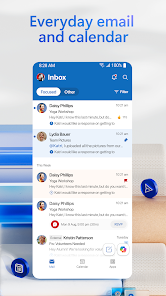
Microsoft Outlook is Microsoft's Android email and calendar app for handling several accounts in one place. The Google Play listing names Exchange, Microsoft 365, Outlook.com, Gmail, Yahoo Mail, iCloud, IMAP and POP3 support. Its free personal use can be enough if your main problem is switching among inboxes and calendars, while some encryption and Copilot functions require a qualifying Microsoft 365 subscription. Outlook is not a new email provider you must adopt to read another service: you can connect existing accounts. The practical question is whether its organization tools and account permissions are worth moving your daily mail routine into one app.
One inbox does not mean one account
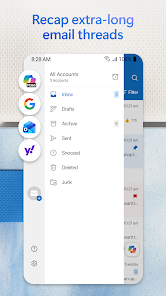
The official description emphasizes a unified inbox, filtering and views of several calendars. That can reduce app switching for someone with work, family and personal mail. Before connecting every address, add one account and verify that folders, messages and calendar events appear as expected. Then add the next account and decide whether the combined view improves clarity or makes boundaries harder to see. A unified inbox is convenient, but it does not merge the underlying providers' storage, security policies or account ownership.
Outlook supports grouped conversations, pinning, flags and search by tap or voice. Swipe gestures can archive, delete, snooze or move mail. Set a swipe action deliberately: if an accidental gesture repeatedly sends important mail somewhere unexpected, the speed benefit disappears. Pinning a critical message and flagging a follow-up have different purposes; use each consistently so the inbox does not become a collection of unrelated markers.
Calendar and meeting workflow
The Play listing says Outlook can show multiple calendars, RSVP to invitations, add notes and join Teams or Zoom meetings from a calendar item. For a person whose day is split across providers, the key check is whether the right account is selected when creating an event or replying to an invitation. A meeting appearing in a combined view does not automatically mean it belongs to the calendar you intended to edit. Verify time zone, account and guest list before sending an invitation.
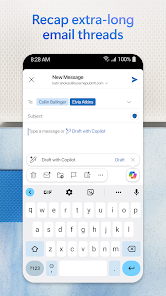
Microsoft also advertises tasks and reminders, delivery or travel updates and suggested replies. These are convenience tools, not a promise that every incoming message will be correctly recognized or scheduled. A travel confirmation is worth checking against the actual provider message; an automatically suggested response is still your responsibility to review. The Wear OS companion app adds glanceable emails, events and an Up Next tile for compatible watches, but is optional rather than necessary for the phone app.
Files and documents inside mail
Attachments can come from the device, OneDrive or other connected storage, and Outlook can open Word, Excel and PowerPoint files from the inbox. This is useful when a document and its discussion belong together, but it also creates a reason to check which copy is being attached. A cloud link may behave differently from a local file attachment, especially for a recipient outside your organization. Review the link's access and the selected file before sending sensitive work.
Microsoft OneDrive is the related storage app if your task is backing up, organizing and sharing files outside an email thread. Outlook is the communication and scheduling surface; OneDrive is the file library. Neither substitutes for checking access settings on a document. If you mainly want a Google-centered inbox, Gmail is another existing option on the site. Compare account support and workflow rather than assuming both apps expose every feature identically.
Security claims and subscription limits
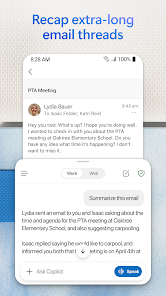
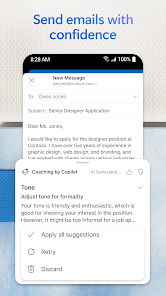
Microsoft's Play text advertises protection against phishing, spam and other threats. That is not a guarantee that every malicious message will be detected. Continue to inspect unusual links and sender addresses. The listing specifically marks email encryption for sensitive messages as requiring Microsoft 365. Copilot features such as thread summaries, draft responses and scheduling suggestions likewise require a qualifying subscription for premium experiences. The app being free for personal use does not make those paid features free.
Adding accounts grants Outlook access needed to display mail and calendar content. If an organization manages a work account, its policies may affect what can be connected or synchronized; the Google Play description alone does not define your employer's rules. Use the appropriate account settings, and confirm with the organization's administrator if a work mailbox cannot be added. The store does not give one universal feature list for every provider and plan, so do not assume a personal Gmail account receives the same enterprise controls as a Microsoft 365 work account.
A setup plan for Android
Install from the official Play listing, connect the account you use most, and inspect the inbox, sent mail and calendar before adding more. Set swipe actions you will remember. Try search and a flag on a message that requires follow-up. Add a second account only after you understand how Outlook labels the sender and calendar. Before sending a document, inspect whether you attached a file or shared a link. If you need encryption or Copilot, verify your exact Microsoft 365 plan rather than buying on the assumption that every paid tier includes the same mobile capability.
Questions people ask
Can I use Gmail or iCloud without changing my address?
Yes. Microsoft's Google Play listing explicitly includes Gmail and iCloud among supported accounts, alongside Outlook.com, Exchange, Yahoo Mail, IMAP and POP3. Connecting an account lets Outlook display it; it does not rename your address or move all your mail to Microsoft automatically. Account-specific settings and security checks may still be needed.
Is Outlook free on Android?
The official listing calls personal use free. It also says email encryption and premium Copilot or Microsoft 365 experiences require a qualifying subscription. Check the current feature and plan descriptions before paying. A free app install is not a promise that every business or AI function is available without a plan.
Can I join Teams and Zoom from the calendar?
The Play description names both meeting services. Outlook can provide a route from an invitation to a meeting, but you still need a valid invitation and the relevant meeting access. Verify which calendar holds the event and review its time and link before joining or forwarding it.
Editorial verdict
Outlook's clearest value is reducing friction between multiple mailboxes, calendars, meetings and document attachments. Its complexity is that account providers, organization policies and Microsoft 365 plans do not all grant the same features. Start with one account and a small workflow before moving everything. This is a reading of Microsoft's published functions and limits, not a claim that we audited its security or measured mail delivery on your device.
Official source: Microsoft Outlook on Google Play. Store details checked October 27, 2026.
App information
- Title
- Microsoft Outlook
- Category
- Productivity
- Platform
- Android
- Download
- Open link