Google Gemini
App preview
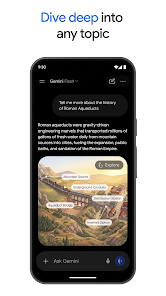
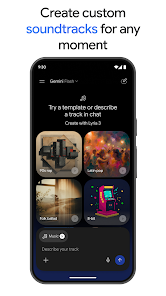
Images supplied with this app listing.
Google Gemini is Google's Android AI assistant for conversation, research, file-based questions and creative work. The current Google Play listing describes Gemini Live conversations, optional screen or camera sharing, connected Google apps and document uploads. It also advertises paid tiers for more demanding tasks and media generation. An assistant can make a first draft or help locate information, but it is not an authority on facts simply because its answer is fluent. The most important setup decision on a phone is that opting in may replace Google Assistant as the primary assistant, while some older Assistant voice functions are not yet available in Gemini.
Use Live when speaking is easier than typing
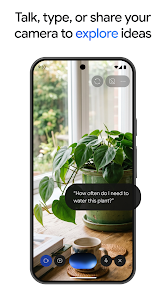
Gemini Live is presented as a real-time conversation mode. Google's Play description says a user can discuss what appears on the screen or camera, not just dictate a text prompt. That can help explain a visible problem, brainstorm while walking or ask about a document open on the device. Before sharing a screen or pointing a camera, check what private information is visible. A notification, account detail or bystander can become part of what the assistant receives. Share the smallest amount of context needed for the task.
The difference between a conversation and a reliable answer remains important. When Gemini interprets a chart, a notice or a photo, inspect the original. It may misunderstand a number, omit a qualification or infer something that is not there. Use follow-up questions to ask where a claim came from, but verify the cited source yourself for health, legal, financial or work decisions. These are ordinary limits of using generated assistance, not a claim that a specific version has a measured error rate.
Connected apps and uploaded files
Google lists connections to Gmail, Calendar, Photos, YouTube and Search for more personalized help. It also says users can upload documents, spreadsheets, photos and videos for answers or summaries. That can make a query more specific than asking an assistant with no context. It also means the scope of information available to the assistant depends on which connections you enable. Start with a narrow use case and review permissions before connecting a mailbox or photo library. A broad integration is not needed for every question.
A useful document workflow is to ask for a summary, then request the exact section supporting each important point, and finally read that section in the original file. This is especially valuable for a long policy or spreadsheet where a missing footnote can change the meaning. If you want to compare several sources, keep track of which answer came from which uploaded file. The Play listing also mentions NotebookLM-grounded research; its availability and workflow should be checked in the current app rather than treated as a guarantee that every response cites a source.
Creative tools and tier boundaries
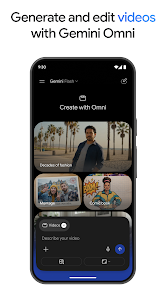
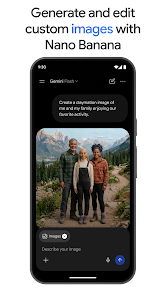
The official description advertises image generation and editing, video creation for eligible Google AI or Workspace users, music generation and prototype creation from prompts. These are distinct activities, with differing plans and usage limits. Do not subscribe because a promotional screenshot depicts a feature without first checking whether it is available in your country, account and tier. Generated media may also need human review for factual accuracy, ownership concerns or unintended resemblance to another work. The app can help make a mockup; that does not grant rights to every input image or output use.
Google says AI Plus, Pro and Ultra upgrades provide greater access for complex tasks. The store text does not make every plan's current quota or price permanent. Review the live plan comparison before paying, especially if your need is one specific model, file size or media tool. For straightforward questions and brainstorming, begin with the available free experience to understand whether the assistant actually fits your workflow.
The Assistant replacement decision
The Play listing explicitly warns that opting in can make Gemini the phone's primary assistant and that some Google Assistant voice features are not available in the Gemini app yet. It says users can switch back in settings. If you depend on a particular voice routine or device-control command, verify that command before treating the replacement as a drop-in upgrade. The app's conversational strengths and its role as a system assistant are related but not identical. A person may like Gemini for writing while still preferring the older assistant for a daily voice task.
For a different AI tool already covered on this site, ChatGPT offers another conversational interface; the deciding factor should be your actual needs, privacy preferences and available plan, not a claim that one model always wins. For managing the documents Gemini might summarize, Google Drive has a different job: storage and file sharing. No single AI answer replaces your source document or the access controls around it.
Privacy and a careful first use
Google links a separate Gemini Apps Privacy Notice from its Play listing. Read it before uploading sensitive documents or connecting personal services. Test with a harmless file first, then ask a narrow question and compare the answer against the source. Keep the phone's screen clear of unrelated private content before invoking Live sharing. If using Gemini for work, confirm your organization's policy for AI tools and approved account rather than assuming a personal account is acceptable for internal information.
The app is free to install according to Google Play, with optional paid tiers described in the listing. The material reviewed does not establish one universal Android minimum version or guarantee that every connected app works in every region. The live Play compatibility notice and in-app settings are the best checks for your device and account. We have not tested latency, voice accuracy or generated-media quality on a particular phone.
Questions Android users ask
Will Gemini replace Google Assistant?
Google says that if you opt in, Gemini becomes the primary assistant on the phone. It also warns that some Assistant voice features are still unavailable through Gemini, and says you can switch back in settings. Test any routine you rely on before committing to the change.
Can I ask questions about a file or what my camera sees?
The Play description advertises document, spreadsheet, photo and video uploads, plus Live conversations with screen or camera sharing. Availability may vary by account or feature. Review the material before sharing it, and verify important answers against the original file or scene; generated responses can omit context.
Do I need a paid plan for every feature?
No. The app is free to install, while Google describes upgrades for more complex tasks and some video-creation capabilities. Exact allowances, models and prices can change. Check the current plan comparison for the particular feature you need instead of assuming all promotional examples are included in the free tier.
Editorial verdict
Gemini's strongest fit is a person already using Google services who wants to discuss files, screens or ideas in one assistant. Its risks are familiar to AI tools but concrete here: connected data needs deliberate permission, generated answers need source checks, and replacing the phone's old Assistant can remove a voice feature you depend on. Start with low-stakes tasks and a narrow connection set. This is an assessment of Google's published capabilities and warnings, not an independently measured model comparison.
Official source: Google Gemini on Google Play. Store details checked October 27, 2026.
App information
- Title
- Google Gemini
- Category
- Productivity
- Platform
- Android
- Download
- Open link