Your Chapter: Book Tracker
App preview
Images supplied with this app listing.
Your Chapter: Book Tracker is a reading journal and library organizer listed under Mindseeq on Google Play. You can search or scan books into a shelf, track pages and reading days, record notes and quotes, build AI-assisted reflection workbooks, and ask questions across your reading history. The Android app is free to download, but some features require a monthly or yearly Pro subscription with a trial. Before moving an entire reading log into it, check what your free account can use and how to retain your data.
Build a library you can actually maintain
The publisher offers three ways to begin: search for a book, scan its barcode, or import an existing Goodreads library. Those routes solve different problems. Search works for a single title you have in mind; scanning is convenient when the physical book is in your hand; importing saves repeated entry if you already have a long collection elsewhere. The Play listing does not explain which Goodreads fields survive an import, whether notes and ratings map perfectly, or how duplicates are reconciled. Test with a small sample before assuming that a years-old library moved without loss.
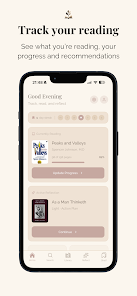
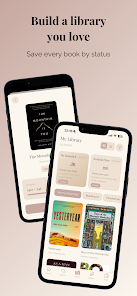
Once a title is on the shelf, the app distinguishes current, planned, and finished books. Update progress as you go; otherwise its reading insights cannot reflect your pace. The publisher says ratings can use flexible scales, including a custom one. If you change your scale later, inspect older scores before comparing them with new entries. A virtual bookshelf, arrangements, and home-screen widgets can make the library pleasant to revisit, but the reading record still needs to be accurate.
Turn notes into a useful reflection workbook
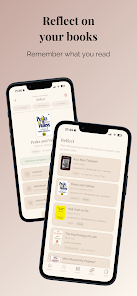
Your Chapter advertises AI-powered workbooks for books you have read. The stated purpose is to capture ideas, favorite quotes, lessons, and possible action plans. A good first use is to choose one nonfiction book and record two or three claims you personally found important. Then use the workbook to ask what changed your view and what you might do differently. That is more valuable than filling every prompt with generic praise. The developer names business, psychology, health, self-help, and personal-growth books as common use cases, but the public description does not limit workbooks to those genres.
An AI-generated prompt can help you reflect, yet it is not a substitute for checking the book. Do not assume a workbook accurately represents an author's exact wording or that it has access to the full text of every title. Keep your own page references with important quotations and verify them before sharing an insight. The listing does not specify which notes or personal reading data are sent to an AI service, how long they are retained, or whether every workbook feature is included in the free tier. The developer's current privacy policy and in-app Pro screen are the right places to settle those questions before recording sensitive personal reflections.
Ask Your Shelf and recommendations solve different problems
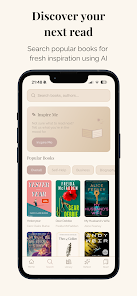
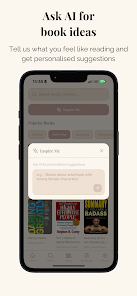
“Ask Your Shelf” is described as a way to ask questions based on your reading history and reflections. It is most useful after you have entered meaningful notes; an empty shelf gives it little personal material to draw from. A question such as “Which books in my log discuss habit change?” is tied to your own record, while “What should I read next?” points toward the separate recommendation feature. The listing says recommendations consider interests, goals, and preferences and also show weekly bestsellers. These are discovery aids, not guarantees that a suggested book is available in your local library or included for reading inside the app.
This distinction matters because Your Chapter is a tracker, not an ebook storefront promise. The Google Play text describes managing and reflecting on books; it does not say that every catalogued title comes with a readable digital copy. If you need the actual book, check a bookseller, publisher, or library. Use the app to decide what to read and remember, not as evidence that the content itself is bundled with a subscription.
Set a habit without letting the streak become the goal
The developer lists annual reading goals, reading plans, day and page counts, streaks, insights, and reminders. Pick a goal that matches your time, then use a reminder as a cue to read rather than a demand to maintain a number. A streak records activity, not comprehension. Compare the progress record with your notes; if it shows pages but no ideas worth keeping, spend more time reflecting.
How it fits beside other writing and workspace apps
Ellipsus is built for drafting and revising prose with collaborators, connected drafts, and Reader links. Your Chapter instead organizes books and your responses to them. A reader who writes essays about books might use both. The published features do not establish direct synchronization, so plan on manual export or copying unless an integration is documented.
Notion can hold a custom reading database inside a general notes and project system. Your Chapter trades that flexibility for book-specific search, barcode entry, shelf display, reading goals, and workbook prompts. A user who already maintains a detailed Notion setup may not need a second library. A reader who finds generic databases too much work may prefer a purpose-built flow. These are workflow differences from the publishers' descriptions, not a claim that one app is universally easier after hands-on testing.
Subscription and data questions to settle
Google Play marks Your Chapter as free to download. Its description says some functions require Pro, offered monthly or yearly with a free trial, but it does not give a stable price or a complete free-versus-paid matrix in the text we reviewed. The listing says billing goes through Google Play, renews automatically, and should be cancelled at least 24 hours before the current period ends. Check the offer's live trial duration, price, renewal date, and cancellation controls in your own account before starting it. A trial is not proof that you can use every AI action without limit.
Importing a Goodreads library, entering notes, and using AI questions may involve information you do not want to lose. The developer's privacy policy names Perplexity AI for workbooks and recommendations and says account deletion is available through Settings, with a seven-day grace period. It does not document a complete self-service export format or offline behavior. Before moving a large archive, test how one book, note, and rating can be preserved outside the app.
Questions readers may have
Can I bring in my Goodreads books?
The Google Play listing advertises Goodreads library import. It does not tell us exactly which shelves, dates, ratings, and notes transfer or how duplicate titles are handled. Import a small set, compare the result with the original, and only then migrate a large history. Keep your original export until you are satisfied that the information you care about survived.
Does the app include the ebooks I add?
The official description presents Your Chapter as a tracker, virtual bookshelf, journal, and recommendation tool. It does not promise a reading copy of every book you catalogue. Searching for or scanning a title adds it to your record; it is not the same as buying or borrowing the text. Obtain books through a seller, publisher, or library as appropriate.
Are workbooks and Ask Your Shelf free?
The publisher says some features require Your Chapter Pro but does not map every AI function to a free allowance in the public description reviewed. Check the current in-app plan comparison before relying on a workbook or Ask Your Shelf for a long project. A free download and a trial do not establish permanent free access to unlimited AI processing.
How do I stop Pro renewing?
The listing says Pro is billed through Google Play and renews automatically unless cancelled before the period ends. It specifies at least 24 hours in its own description. Open Google Play's subscription controls for the account that made the purchase, confirm the renewal date and status, and retain the cancellation confirmation. The current checkout terms take precedence over an older article if a plan changes.
Our take on the reading workflow
Your Chapter is most compelling for readers who will use both halves of it: a reliably updated shelf and reflection on what those books meant. Its barcode and Goodreads import options reduce setup work, while workbooks and shelf questions could make notes more searchable. The unresolved choices are Pro's exact feature boundary, handling of personal reflections, and portability of a large archive. This assessment follows its published feature and billing descriptions, not a hands-on test of its AI answers or import accuracy.
Official source: Your Chapter: Book Tracker on Google Play. Store facts were checked October 22, 2026.
App information
- Title
- Your Chapter: Book Tracker
- Category
- Productivity
- Platform
- Android
- Download
- Open link