
HolyNote: Sermon Notes
App preview
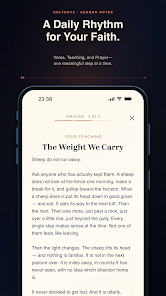
Images supplied with this app listing.
HolyNote: Sermon Notes is an Android note-taking and Scripture-study app listed under Jomatsapp on Google Play. It combines sermon recording, optional AI transcripts, passage scanning, an offline Bible, and daily reflections. It turns an authorized recording into a note you can revisit; an AI answer is no substitute for the source. The app is free to install and lists in-app purchases, but the public listing lacks a stable Android price or full free-versus-paid feature table. Check the current paywall before depending on online processing.
Start with the source, not the generated summary
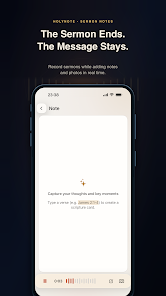
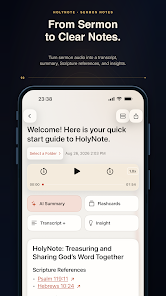
The developer says you can record a sermon while typing your own notes, attach a photo of a slide or handout, or import a supported audio file already on your device. The finished recording and note live in a local library where you can pin important items and organize them into folders. After you request AI processing, HolyNote may produce a transcript, structured summary, key takeaways, Scripture references, reflection prompts, a prayer, and review flashcards, depending on what the source supports. Timestamps appear when reliable timing is available; they should not be assumed for every recording.
For a first session, record a short authorized talk, add context while listening, and compare the generated summary against the audio. Check the central argument, Bible references, and quotations. If a point matters for a lesson or public post, return to the recording. The developer warns that transcripts, interpretations, and references can be inaccurate. HolyNote organizes material; it cannot validate a theological conclusion.
Scanning a passage has a review step
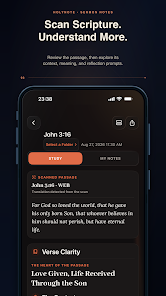
HolyNote can photograph a Bible passage or choose an image from your gallery. Its description says text recognition begins on the device, then the app lets you correct the detected verse or passage before requesting an AI study. The publisher's privacy policy is more precise: after you choose to use the passage, the reviewed text and reference are sent for online processing, but the scan photo is not sent in that flow. This distinction matters if an image includes other content that should remain private. It also means a poor camera capture can still cause a wrong study if you accept a mistaken reference without checking it.
Use the review screen to compare chapter, verse numbers, and wording with the original page. Different Bible editions can word the same passage differently, and a generated explanation may not reflect your community's tradition. The developer's legal text identifies the built-in Bible as the World English Bible; a photographed passage could be another edition. Keep those sources separate when quoting. If you need a general document scanner rather than a passage-specific review and study flow, Scanner: Scan PDF, Docs, Cards is oriented to documents and PDFs, not Scripture interpretation.
Daily reflection and a local reading library
Beyond recorded sermons, HolyNote offers a daily Verse, Teaching, and Prayer sequence. The app describes a completion-based streak rather than a promise that simply opening it counts as a finished day. You can also read and search Scripture offline, highlight passages, write personal verse notes, and return to saved places. That gives the app a useful role on days when you do not want to upload audio or ask an AI question. Treat the streak as a reminder to reflect, not as evidence of understanding or spiritual progress.
The local-first design has a tradeoff. The privacy policy says notes, recordings, images, chat history, reading preferences, and Today progress stay on the device, without an account or cloud note sync. It says Android app backup and device transfer are disabled. Removing the app generally removes local information, while deleting local data does not automatically erase provider records. If a note is irreplaceable, make a permitted copy through a workflow you have verified; automatic restoration on a new Android phone is not promised.
What goes online when you choose AI
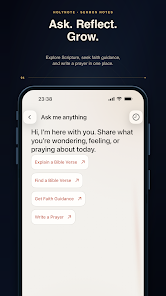
HolyNote's local library is not the same thing as fully offline AI. The privacy policy says selected audio, typed recording notes, reviewed Scripture text, a requested link, or a question with relevant context is sent to HolyNote's service when you invoke the corresponding online feature. The service uses OpenAI API processing for transcription and generated notes or answers. Temporary audio is normally removed after a job finishes, and the policy says AI job transcripts and results stay in its current temporary in-memory store for no more than 24 hours by default. Provider-side retention can differ, so those statements are not a guarantee that no trace exists after 24 hours.
Sermons and prayer requests can reveal beliefs or another person's private circumstances. Record or process content only with permission, especially in a group, counselling setting, or with copyrighted material. For private reading, use the offline Bible and local notes without invoking AI. The Android policy identifies Meta and AppsFlyer for installation, session, and commercial measurement but says note and sermon content is not intentionally sent to them. Google Play's data-safety panel separately reports possible collection and sharing of location and financial categories. Read both disclosures before entering sensitive material.
Subscriptions, permissions, and practical limits
Google Play labels HolyNote as containing in-app purchases, and the publisher's privacy policy discusses subscription verification and purchase restoration. Neither the public Play description nor the Android-facing policy gives a reliable full price list or an exact number of free AI requests. Review the live offer, trial duration if any, renewal price, and cancellation controls inside Google Play before buying. The developer's older terms page describes Apple billing for an iOS app; do not apply those Apple-specific steps to an Android purchase. On Android, Google Play manages the purchase account.
Microphone permission is needed for recording, camera permission for scanning or adding a photo, and Files or photos access for material you choose to import. Notifications are optional. Refusing one permission should affect the feature that needs it, not necessarily the rest of the library. The privacy policy says Android crash reporting is separately optional in HolyNote's Settings, but switching it off does not disable the distinct Meta measurement described there. Online AI requests require connectivity; reading Scripture and saved local notes are the offline uses explicitly described by the developer.
How HolyNote compares with a general reading journal
Your Chapter: Book Tracker tracks books, progress, and reflection workbooks across a personal library. HolyNote focuses on sermons, Bible passages, references, and daily devotional notes. A reader logging many books may prefer the tracker; someone reviewing a recorded talk needs the sermon workflow. Neither publisher promises direct sync between them. Choose based on what you want to preserve and what you would send for AI processing.
Questions worth answering before recording
Can I use HolyNote without an account or internet connection?
The developer's privacy policy says there is currently no HolyNote user account or cloud note sync. Its Play description says Scripture reading, highlights, and saved local notes work offline. AI transcription, studies, and answers require a request to its online service. A local-only library is convenient without a login, but it also means you should not expect automatic recovery after removing the Android app.
Is the scanned Bible photo uploaded?
For the passage-scan flow, the publisher says recognition starts on the device. You review or correct the detected text, and the reviewed passage text and reference—not the photograph—are sent when you request an AI study. Other features, such as attaching an image to a note, may have different handling. Check the current policy and feature screen before processing a sensitive image.
Can I record a sermon given by someone else?
Only if you have the needed permission and comply with local recording and copyright rules. The developer explicitly instructs users to process authorized material and to inform people or obtain consent where required. An available microphone button does not itself grant rights to record a speaker, private conversation, or online video. Keep especially sensitive prayer and counselling details out of uploads unless everyone involved understands the processing.
Can I rely on its transcript or Scripture references?
Use them as drafts for review. The developer warns that generated transcripts, references, and interpretations may be incomplete or wrong. Compare quotations against the recording and a trusted Bible edition; correct the scanned passage before a study begins. If you share a note or teach from it, the responsibility for accuracy remains with you, not the AI output.
Our take on the workflow
HolyNote has a coherent sequence: capture an authorized source, add context, request help organizing it, and revisit the resulting note alongside Scripture. The review-first passage scan and explicit local-versus-online distinction are more useful than a generic promise of “AI Bible study.” Its main limitations are dependence on online processing for AI features, uncertain public pricing for Android, and the lack of automatic cloud backup for local notes. This is an assessment of the developer's published functionality and disclosures, not a hands-on test of transcription quality or doctrinal accuracy.
Official sources: HolyNote on Google Play and the developer's privacy policy. The store listing and policy were checked October 22, 2026.