
PulseTCG
App preview
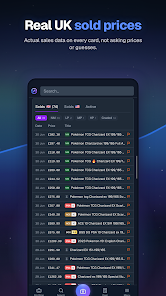
Images supplied with this app listing.
PulseTCG is a trading-card collection and inventory app from PulseTCG, newly listed on Android. It uses a camera scanner to identify cards, displays market estimates for raw and graded copies, and organizes holdings into portfolios, binders, watchlists, and seller stock. Its strongest use is keeping purchase cost and current market data in one place before a trade, not treating a displayed price as a guaranteed sale. Google Play offers it free to install with in-app purchases; the publisher's site says free to start but does not publish a complete Android plan comparison on the pages reviewed. Check current limits before moving a large collection into it.
Scan a card, then verify the exact version
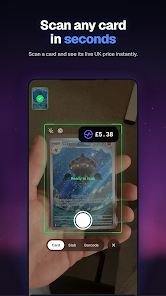
The official listing says you can point your camera at a card to identify it, price-check it, and add it to your collection. Scanning removes repetitive typing, but an identified character or artwork is not enough to establish value. Sets, printings, condition, grading, and language can change which market record applies. Before accepting a result, compare the card number and variant with the physical copy. The publisher does not claim that every scan is error-free, so a valuable card deserves a manual check against the marketplace data shown in the app.
PulseTCG's developer site says its live data covers Pokémon, One Piece, and Lorcana; the Play description also discusses raw and graded prices. That range is useful for collectors with more than one game, but availability of a specific set or regional print is not established by the short public summary. Try a sample of cards you know well before importing a whole binder. For a general camera-to-PDF workflow, Scanner: Scan PDF, Docs, Cards captures documents; it does not promise to identify a trading-card printing or calculate a portfolio value.
Use portfolios to separate cost from estimated value
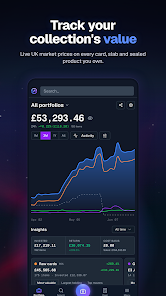
Multiple portfolios can keep a personal collection separate from sale inventory or another game. The app advertises cost price, market value, gains and losses, return over time, charts, and history. Entering an accurate acquisition cost is essential: if it is missing, a gain figure cannot tell you what you really earned. Fees, postage, taxes, grading costs, and the time required to find a buyer can also make a sale outcome differ from a displayed market estimate. The publisher's own site disclaims investment advice and says market data may be incomplete or inaccurate.
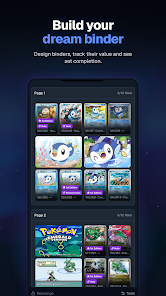
Digital binders address a different question from a portfolio total. They let you organize a set visually, follow its estimated value and spending, and see what completing it may cost. A collector may want a missing card for completion even if its current price is unattractive; a reseller may judge the same card by likely margin. PulseTCG makes both views available but cannot make that decision for you. Compare a recent sale history and the exact card condition before paying an asking price solely because it appears below an app estimate.
Watchlists, alerts, and trade checks
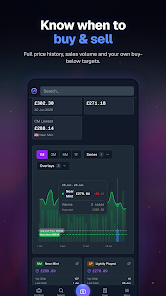
The listing describes buy and sell targets with price alerts. A watchlist is most useful if each alert represents a real action you are willing to take, such as checking a seller listing or reconsidering a trade. Prices can move while an offer is unavailable, and a push alert does not reserve a card. The developer's privacy policy says mobile notifications require permission and a device token; you can disable them in device settings. If you do not want alerts, you can still review the watchlist manually.
PulseTCG also offers a trade calculator that compares both sides at market value and records the deal. That can expose a large mismatch quickly, but condition, authenticity, shipping, and trust in the other trader still matter. A “fair” number is not a substitute for inspecting the actual cards. Seller inventory tools add stock management, pricing rules, purchases, sales, and profit tracking. The listing does not establish that these tools meet every business accounting or tax requirement, so keep your own records where required.
Account and data considerations
The publisher's website asks users to create an account and its privacy policy says it stores collection entries, portfolios, uploaded images, notes, and preferences. It may also process email, billing status, device information, and camera images used for identification. Google Play's data-safety panel reports possible collection of personal and financial information and some sharing of app-performance data. The policy says Sentry may capture masked session replays for troubleshooting, and optional connected AI assistants can receive portfolio data only if the user chooses that connection and enables portfolio access. Those are reasons to review the current privacy controls before recording purchase costs or linking another account.
Prices and portfolio gains can be sensitive even when the cards themselves are not. The publisher says a connected assistant does not receive passwords, payment details, notes, or uploaded images, and can be disconnected under Settings > Security; it also warns that disconnecting cannot remove data already received by that assistant's provider. That is a description of an optional feature, not a reason every collector must enable it. If you only want card identification and manual tracking, avoid granting more access than your workflow needs.
How it differs from a general library tracker
Your Chapter: Book Tracker also turns a physical collection into a digital shelf, but its purpose is reading progress and reflection. PulseTCG is about card variants, market estimates, trades, and stock. Neither app's published features establish direct migration into the other. Use the book tracker if the goal is remembering what you read; use PulseTCG if the question is which cards you own, what you paid, and how market estimates have changed. The site's productivity apps category covers other tools for organizing information, though it cannot verify a card's sale price for you.
Questions before adding your collection
Does a scan tell me exactly what my card is worth?
No single scan can guarantee a sale price. PulseTCG identifies a card and shows market data, but the publisher itself warns that such data may be incomplete or inaccurate. Verify set, printing, condition, grading, and currency before using an estimate. A recent sold listing for the same variant is stronger evidence for a particular transaction than an unmatched portfolio total.
Can I track several collections separately?
The Google Play listing advertises multiple portfolios and digital binders. Those can separate a personal set, trade stock, or another card game. It also advertises cost, market value, gains and losses, and history. Check the current free-tier limits before entering a large catalog, because the public pages reviewed do not fully map every feature to a paid or free plan.
Are the price alerts a promise that I can buy or sell at that price?
No. They notify you that the app's tracked market value has reached a target; a real listing may be gone, differently graded, or subject to fees and shipping. Use an alert as a prompt to inspect available offers, not as an automatic trade instruction. The publisher explicitly says its information is not investment advice.
Is PulseTCG affiliated with the card brands?
The app's Google Play description says it is independent and is not affiliated with, endorsed by, or sponsored by Nintendo, The Pokémon Company, or Wizards of the Coast. Card names and images remain with their owners. This matters when judging a data source: a useful scanner is not an official marketplace or brand price guarantee.
Our take on the collector workflow
PulseTCG's practical value is joining identification, cost records, and market context before a purchase or trade. Portfolio views and seller inventory could save manual bookkeeping, provided the exact card variant and costs are entered carefully. Its limitations are the uncertainty of any live valuation, unclear public free-tier boundaries, and the privacy implications of storing financial details about a collection. This is a review of the publisher's documented workflow, not a hands-on test of scanner accuracy or a recommendation to invest in cards.
Official sources: PulseTCG on Google Play, the publisher's website, and its privacy policy. Checked October 22, 2026.
App information
- Title
- PulseTCG
- Category
- Productivity
- Platform
- Android
- Download
- Open link