
Sine: Ear Training Games
App preview

Images supplied with this app listing.
Sine: Ear Training Games teaches note recognition through short listening lessons and games rather than asking you to memorize a piano chart. It starts with C and G, adds notes as you distinguish them, and turns mistakes into later practice. The Android app first appeared on Google Play in September 2026; the developer also offers an iPhone version. You can learn the first octave and use several games for free, while later units and unrestricted play sit behind Encore. It is a good fit for a musician who wants a daily ear-training routine, but its promise that adults can learn perfect pitch should be read as the developer's educational position, not a guaranteed outcome for every learner.
What happens in a Sine lesson?
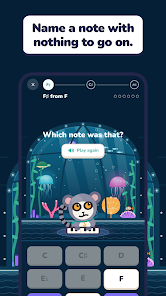
Before introducing a note, Sine places it on a keyboard and plays it alongside notes you already know. You then hear a note and identify it without a reference tone. If your answer is wrong, the app plays your chosen note followed by the correct one. That comparison is more instructive than a red cross alone: you can hear the size and direction of the gap and try again. The developer says the app records which notes you confuse and builds practice around those misses. It begins with two notes, then adds more until all twelve chromatic notes are in play.
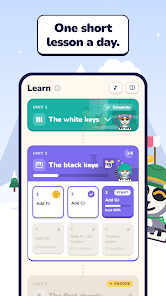
The progression is divided into ten units, moving from white keys to black keys and eventually chords. The first unit covers the first octave; subsequent units can include lower octaves, different voices, traps, and more advanced listening tasks. A learner who can already identify all seven white keys on the first try may skip the opening unit, according to the Play description. That is not the same as skipping all later tests. Take the early comparisons seriously even if you play an instrument: recognizing a note in a known song is not necessarily the same as naming an isolated sound.
A practical daily practice sequence
Start by listening to each new note and humming it before you make a guess. The developer's own teaching flow encourages hearing, humming, and locating the note on a piano. In a short session, answer the current lesson, review the notes you missed, and then use a game to change the context. Repeatedly guessing until a streak appears may improve that specific pattern without strengthening recognition across instruments. The app includes sounds beyond one piano timbre, so check whether you can identify a note when its tone changes.
After a lesson, inspect the progress view for confusions that repeat—for example, a note you often choose when another is played. Listen to that pair deliberately rather than rehearsing all twelve equally. A weekly Sine Score can help you see whether the broader skill changes over time, but one score is not a clinical or scientific certification of perfect pitch. The developer's site says the score opens once a week and combines note naming, tuning, holding a note through intervening sounds, and detecting a changed note. Use it as an in-app benchmark, not a promise of musical talent.
Games test more than the basic flashcard
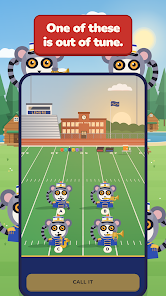
Sine Duel asks you to name a note before Sine does. Defuse asks you to tap back a sequence of notes. Tune-up makes you judge whether a sound is flat, sharp, or in tune. The developer's website also describes Out of Tune, where you isolate a player in a virtual band or orchestra and find the performer whose pitch is off. Some maps add subtler changes or multiple mistakes. Those modes matter because a guitarist tuning a string, a singer holding a reference pitch, and a keyboard player naming a note are related but not identical tasks.
Social play is also available: the Play listing says you can play against a friend on one phone, while the developer website describes Rivals leagues and Sine Circles. A Circle is a shared practice garden in which answers help a group's tree grow. These features can make repetition less lonely, but they are optional to the basic listening exercise. Draw Music Maker serves a different purpose, letting users create and export melodies; Sine focuses on recognizing what you hear. If your aim is learning a visual language rather than sound, ASL Lessons: Learn & Practice is another structured practice app, not a substitute for ear training.
Free access versus Encore
Sine's developer website gives a more useful breakdown than a generic “free to start” label. The free tier includes the warm-up, every note, the first octave unit, Quick Practice, stats, badges, a weekly Sine Score, and several games. It lists four plays every six hours for some game access. Encore removes those play limits, unlocks later units and additional maps, and opens more of the chord, interval, and singing library. If you only need to test whether daily note naming holds your attention, the free tier should answer that before you subscribe.
At the October 22 check, the developer advertised a seven-day Encore trial, then US prices of $14.99 per year, $1.99 per month, or $29.99 once. Your Google Play storefront determines actual regional prices, tax, eligibility, and renewal terms. Do not treat a website price as a guaranteed charge for your account. The one-time option and subscription are different purchase choices; inspect exactly which product your checkout screen names. If you start a trial, use Google Play's subscription settings to confirm its end date and cancel there if you do not want a renewal.
Progress, accounts, and privacy boundaries
The Play listing says progress is saved on the phone and can follow you to a new device if you sign in with Google or Apple. That implies a useful distinction: a local practice session does not require you to assume every result is instantly available on another phone. Verify sync in your account before replacing or resetting a device. The developer says there are no ads and no tracking, but that statement is not proof that no account or diagnostic data is ever processed. Read the current privacy policy and Google Play Data safety panel if your practice history or sign-in identity is sensitive to you.
A recorded grand piano is used throughout the experience, according to the Play description. You may still hear other instrument challenges on the developer site. Use headphones or a quiet room for a fair note-identification session; speaker quality and surrounding noise can make close pitches harder to judge. That is a practical listening precaution, not a tested requirement or a performance claim about this app. Sine does not replace a teacher who can assess your voice, instrument technique, and broader musicianship.
Questions a new learner may have
Must I already read sheet music?
The announced opening teaches notes by sound and shows their keyboard positions before quizzing you. It begins with C and G instead of assuming you can name all twelve. Reading notation may help a musician connect the exercise to an instrument, but the public description does not list it as an entry requirement. Start with the free first unit and see whether the audio explanations are clear to you.
Does Sine guarantee perfect pitch?
No guarantee is stated in the public material. The developer argues that note recognition can be learned in small steps, and the app tracks progress toward naming notes without a reference. Outcomes will vary with practice, hearing, context, and prior musical experience. Treat the Sine Score as feedback within this program rather than an independent diagnosis of perfect pitch.
Is everything free without ads?
The developer says there are no ads, and the free tier covers the first octave unit, basic practice, a weekly score, and limited plays in several games. Encore pays for later units, unlimited games, and more library content. Current purchase screens control price and trial terms. A free download does not mean every advanced course or mode is unlocked.
Can I move my practice history to a new phone?
The Google Play description says progress is stored on-device and can follow you when you sign in with Google or Apple. Before switching phones, confirm that your account is connected and your lessons appear on the replacement device. Do not delete the old installation on the assumption that a local-only session was automatically backed up.
Our take
Sine's strongest educational choice is to play a wrong answer next to the correct note, then revisit the pair the learner actually confuses. Its games give that same listening skill several forms without making a subscription mandatory for the first unit. The main caution is to separate the developer's motivating “perfect pitch is learnable” message from a personal guarantee, and to check Encore's regional price before the trial ends. This assessment is based on the official app listing and developer documentation, not a claim that we measured learning outcomes.
Official sources: Sine: Ear Training Games on Google Play and the developer's feature and pricing page. Checked October 22, 2026.