Scanner: Scan PDF, Docs, Cards
App preview
Images supplied with this app listing.
Scanner: Scan PDF, Docs, Cards is an Android document scanner from Deep Flow Apps. It turns camera captures or existing photos into PDFs, then lets you search recognized text, rearrange pages, add a drawn signature, and export a file. That combination makes it useful when a receipt, contract, ID card, or handwritten page must become a shareable document without finding a desktop scanner. It is free to install but Google Play marks in-app purchases, so do not assume every editing or recognition function stays free. The listing does not clearly separate paid features from the initial download.
From a paper page to a usable PDF
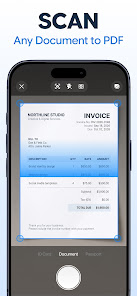
The developer describes automatic border detection, perspective correction, and cropping. In practical terms, the first step is to lay the page flat in even light and keep its corners inside the camera view. Capture it, then inspect the crop before adding the next page. The app is advertised as collecting multiple captures in their scanned order into one PDF, which is more useful for a form or short packet than sending twenty unrelated images. If a page is dark or clipped, retake it before sharing; automatic correction cannot restore text that was never captured clearly.
The store also describes black-and-white, grayscale, and color choices. A high-contrast black-and-white copy may suit plain text, while color can matter for stamps, diagrams, or handwritten marks. Choose a setting based on what the recipient needs to read rather than assuming the smallest file is always best. We have not measured output quality or file size on specific phones. The listing says the app can open existing PDFs and import gallery pictures, so a document photographed earlier can be brought into the same workflow instead of rescanned from paper.
Cards, receipts, and document organization
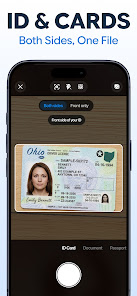
Deep Flow Apps advertises a dedicated capture mode for ID cards, passports, business cards, and similar small documents. Front and back can appear side by side on one page. That is convenient for a requested copy, but it does not make sharing identity documents risk-free. Check the recipient, destination, and purpose before sending a passport or driver's license; redact information the recipient does not need where appropriate and allowed. The store description does not establish where every scan is stored or whether a particular document remains only on your device.
OCR search and text reuse
Scanner's listing says it runs text recognition on scanned documents, making text inside a page searchable. It also describes selecting and copying recognized paragraphs. This is a meaningful distinction from merely photographing paper: a person can look up an invoice number or a name later without remembering the file title. For a reliable archive, however, verify the recognized text against the original image. OCR can misread small print, handwriting, low-contrast receipts, or similar-looking digits, and the store does not publish an accuracy guarantee.
Do not treat recognized text as a substitute for the scanned page when a number or legal phrase must be exact. Copy it into a note or email only after checking the source, and keep the original image or PDF available for reference. The listing does not clearly say whether OCR runs on-device, needs a network connection, or is included without an in-app purchase. If any of those points matters to your workflow, check the current in-app prompts and developer support before committing sensitive documents.
Editing, signing, and sending
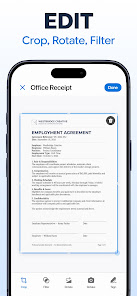
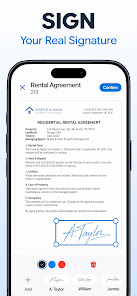
The advertised PDF tools include reordering, rotating, deleting, and adding pages, plus merging documents. A simple quality-control pass is to check page order after a multi-page scan, rotate any sideways page, and remove accidental captures before exporting. The app also offers a saved drawn signature and date placement. That can speed up routine forms, but a digital drawing is not automatically accepted for every contract or jurisdiction. Confirm the recipient's signature requirements before using it for a consequential document.
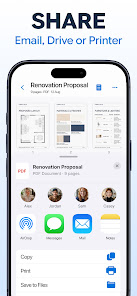
PDF and JPG export are listed, along with sharing through email, messaging, local files, or the gallery. A PDF normally makes more sense for a multi-page packet, while a JPG may be easier for one image. The recipient may have their own format or size requirements; check those first. After sharing, open the exported file yourself to ensure the crop, page order, signature, and readability survived the final step. The store does not promise secure delivery merely because the file was produced in the app.
How it differs from other tools on YouxiSky
CamScanner also targets mobile scanning and PDF creation. Scanner: Scan PDF, Docs, Cards emphasizes its integrated capture, OCR search, page editing, card layout, and signature workflow in its current Google Play description. We have not performed a controlled scan-quality or pricing comparison between the two; compare live feature limits, export quality, and privacy terms before moving an established document archive. A familiar name alone should not decide which app handles sensitive paperwork.
Notion solves a different organizational problem: notes, databases, and collaborative workspaces rather than turning paper into signed PDF files. A reasonable workflow might use a scanner for the source document and a workspace app for the project context, but that does not mean their accounts or storage are automatically connected. If you only need searchable notes, a general workspace may be sufficient; if you need a properly cropped, ordered PDF to send, a dedicated scanner has a clearer purpose.
Cost, Android support, and data questions
Google Play shows free installation, in-app purchases, Android 11 or later, and version 1.0.2 at the October 22, 2026 check. The listing shows an in-app price range, but it does not specify exactly which individual tools require payment in the public description. Review the prompt presented at the moment you use a premium function and the current Google Play purchase terms before accepting a charge. The app's original store release date is October 5, 2026; the October 20 date shown elsewhere is a later update, not the launch.
The developer's Google Play data-safety declaration says no data is shared with third parties and that the app may collect app activity, app information and performance data, and device identifiers. It also says data is encrypted in transit. Those are developer disclosures, not an independent security audit or proof that document contents never leave the phone. For IDs, financial records, or medical paperwork, read the current privacy policy and confirm storage and deletion behavior before scanning. We could not verify an offline-only mode or a clear guarantee about scan retention from the public listing.
Common questions about Scanner
Can I scan several pages into one PDF?
Yes. The developer says a multi-page capture keeps pages in the order scanned and saves them as one PDF. It also advertises reordering and deleting pages afterward. Review the sequence and legibility before you send it, especially when a form has front and back sides or a signature page that must appear last.
Does it make text inside scans searchable?
The Google Play description advertises text recognition and search within scanned documents, plus copying recognized passages. That can help retrieve a file by a name or invoice number. It does not guarantee perfect recognition of handwriting or faded receipts. Check critical extracted text against the page image before using it in a payment, application, or contract.
Is the app completely free?
No such guarantee is in the listing. Installation is free, but Google Play explicitly flags in-app purchases. The public description does not provide a dependable feature-by-feature paywall table, so test the exact scan, OCR, edit, or export action you need and read any payment prompt before subscribing or buying. Store prices can vary by region and date.
Can I use it to sign any legal document?
The app advertises placing a drawn signature and date on a PDF. Whether that satisfies a recipient or a legal process is a separate question. Some forms require a specific electronic-signature service, identity verification, or a handwritten original. Ask the receiving organization what it accepts rather than relying on the presence of a signature button.
Are my scans guaranteed to stay on my phone?
We could not verify that guarantee. Google Play's data-safety information is a developer declaration about collection and sharing, not a full description of every storage or processing step. Before scanning sensitive material, inspect the app's privacy policy, permissions, account prompts, and deletion options. Use a workflow whose handling rules you understand.
Our take on who should try it
This app makes the most sense for someone who repeatedly turns paper into multi-page PDFs and wants OCR, card layout, edits, and a signature tool in one place. Its limits are equally important: the public listing does not resolve exactly which actions are paid or how every document is processed. Verify those points in the app before relying on it for confidential or business-critical records. This is an assessment of published functionality and disclosures, not a claim that we tested scan accuracy or security.
Official source: Scanner: Scan PDF, Docs, Cards on Google Play. Store details were checked October 22, 2026.
App information
- Title
- Scanner: Scan PDF, Docs, Cards
- Category
- Productivity
- Platform
- Android
- Download
- Open link