Obsidian
App preview
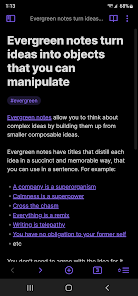
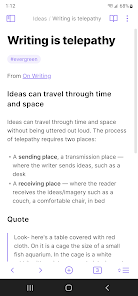
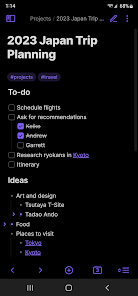
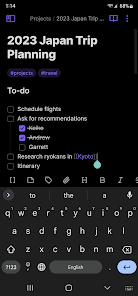
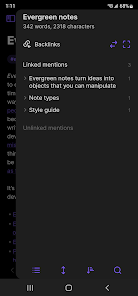
Images supplied with this app listing.
Obsidian is Dynalist Inc.'s Android app for a personal knowledge base built from local Markdown files. A folder of notes is called a vault; links between notes let a topic grow beyond one long document. It suits a writer, researcher or student who wants files they can keep and reorganize, not someone who expects a ready-made shared workplace database on first launch. The app is free to install and use locally. Obsidian's own pricing page treats Sync and Publish as optional paid services, so installing the mobile app does not automatically synchronize every vault across devices.
Start with a vault you can understand
Obsidian's official help site recommends creating a vault, making a first note and linking notes as separate first steps. Begin with a small folder and a few subjects you genuinely revisit. Write a plain Markdown note, add a second note for a related idea, then link the two. This tests whether a network of small notes helps you more than a single document. Because the files live locally, you can access them offline; it also means you must think about backup and synchronization rather than assuming a remote account quietly protects every edit.
The Android listing names a customizable toolbar, pull-down quick actions, share-to and share-from Obsidian, graph view, community plugins, themes and tablet sidebar pinning. Use the toolbar for actions you repeat often rather than trying to expose every command. Graph view can show connections, but a dense graph does not prove the notes are useful. A link should help you find or explain a relationship, not exist just to make the visualization more elaborate.
Plugins and themes add power with responsibility
The official help separates built-in core plugins from community plugins. Core plugins are features you can turn on or off; community plugins extend Obsidian through software made by users. A first vault does not need dozens of add-ons. Learn ordinary editing, linking and search first, then install a plugin only for a real missing workflow. Check its current compatibility and trust implications, especially before granting access to a vault containing private notes. A theme changes presentation, not the ownership or backup of your files.
Obsidian's help also lists Bases, Web Clipper and Publish among its broader ecosystem. Those tools answer different needs: organizing or viewing data, saving web material, and putting selected notes on the public web. Do not assume that a private vault becomes public simply because a publishing service exists, or that purchasing Publish is necessary to read local notes. Decide what should stay private before turning a note collection into a site.
Sync is a separate decision from taking notes
The official sync guide says the notes remain local and that a sync method must be configured to use them across devices. Obsidian Sync is its first-party supported option and is paid on the current pricing page. The guide also discusses third-party and local approaches such as OneDrive, Google Drive, Syncthing and Git, but warns that methods differ by operating system and can create conflicts or duplication. Do not combine multiple sync methods on one vault without reading the current instructions. A sync copy is also not a full backup against accidental deletions, so follow the separate backup guidance.
If you already use Notion, the useful distinction is data model and collaboration. Obsidian centers on local plain-text Markdown files and your chosen extensions; Notion centers on a hosted workspace with its own page and database system. Moving between them is a migration, not a simple account sign-in. If you want a phone-first note tool, compare how quickly each lets you capture and later retrieve an idea. Other choices appear in productivity apps.
Cost and compatibility
The Obsidian pricing page says the main app is free without sign-up. Its Sync plan is optional and currently priced as a recurring service; the live page is the authority for the amount in your currency and billing period. Publish is another optional service with a separate price. The Google Play page does not list a fixed universal Android version or storage footprint in the material reviewed here, so check your own device's compatibility and the space your notes and attachments will require.
Questions new note-takers ask
Will my notes appear on another phone automatically?
No. Obsidian's official guide says notes are stored locally and you must set up a sync method to use them across devices. Its first-party Sync service is optional and paid; other methods have different setup and conflict risks. Test with a noncritical vault and keep a separate backup before relying on any method.
Can I read notes offline?
Yes. The official sync guide says local notes remain accessible even without a connection. That does not mean a change made offline has reached another device. Wait for your chosen sync system to complete and check for conflicts before editing the same note elsewhere.
Do I need plugins to make linked notes?
The getting-started help teaches linking notes as a basic workflow. Community plugins can add specialized behavior, but they are not a prerequisite to create a vault, write Markdown or build links. Add them only when you understand the workflow and the plugin's source.
Editorial take
Obsidian is strongest when file ownership and flexible linking matter more than instant team collaboration. The cost of that flexibility is responsibility for vault organization, backups and a deliberate sync setup. This conclusion is based on Obsidian's store listing and help documentation, not a claim that YouxiSky tested every plugin or migration route.
Official sources: Obsidian on Google Play, Obsidian sync guide and official pricing. Checked October 29, 2026.
App information
- Title
- Obsidian
- Category
- Productivity
- Platform
- Android
- Download
- Open link